Ankihub add-on startup failed

I am using anki 25.09.2 at arch linux, installed with the core package from pacman

Ankihub used to work at this same setup for some weeks but now is giving this error:
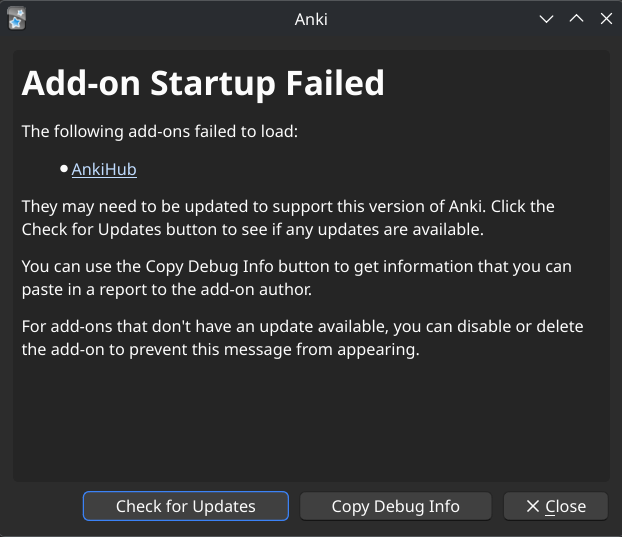
Anki 25.09.2 (3890e12c) (ao)
Python 3.14.2 Qt 6.10.2 PyQt 6.10.2
Platform: Linux-6.12.71-1-lts-x86_64-with-glibc2.43

When loading AnkiHub:
Traceback (most recent call last):
File “/usr/lib/python3.14/site-packages/aqt/addons.py”, line 250, in loadAddons
import(addon.dir_name)
~~~~~~~~~~^^^^^^^^^^^^^^^^
File “/home/mcerrer/.local/share/Anki2/addons21/1322529746/init.py”, line 28, in
from . import entry_point
File “/home/mcerrer/.local/share/Anki2/addons21/1322529746/entry_point.py”, line 14, in
from .db import ankihub_db
File “/home/mcerrer/.local/share/Anki2/addons21/1322529746/db/init.py”, line 1, in
from .db import ( # noqa: F401
…<4 lines>…
)
File “/home/mcerrer/.local/share/Anki2/addons21/1322529746/db/db.py”, line 39, in
from ..ankihub_client import Field, NoteInfo, suggestion_type_from_str
File “/home/mcerrer/.local/share/Anki2/addons21/1322529746/ankihub_client/init.py”, line 6, in
from .ankihub_client import ( # noqa: F401
…<10 lines>…
)
File “/home/mcerrer/.local/share/Anki2/addons21/1322529746/ankihub_client/ankihub_client.py”, line 45, in
from .models import (
…<19 lines>…
)
File “/home/mcerrer/.local/share/Anki2/addons21/1322529746/ankihub_client/models.py”, line 55, in
class NoteInfo(DataClassJSONMixinWithConfig):
…<12 lines>…
)
File “/home/mcerrer/.local/share/Anki2/addons21/1322529746/lib/mashumaro/mixins/dict.py”, line 26, in init_subclass
compile_mixin_unpacker(cls, **builder_params[“unpacker”])
~~~~~~~~~~~~~~~~~~~~~~^^^^^^^^^^^^^^^^^^^^^^^^^^^^^^^^^^^
File “/home/mcerrer/.local/share/Anki2/addons21/1322529746/lib/mashumaro/core/meta/mixin.py”, line 49, in compile_mixin_unpacker
builder.add_unpack_method()
~~~~~~~~~~~~~~~~~~~~~~~~~^^
File “/home/mcerrer/.local/share/Anki2/addons21/1322529746/lib/mashumaro/core/meta/code/builder.py”, line 584, in add_unpack_method
self._add_unpack_method_lines(method_name)
~~~~~~~~~~~~~~~~~~~~~~~~~~~~~^^^^^^^^^^^^^
File “/home/mcerrer/.local/share/Anki2/addons21/1322529746/lib/mashumaro/core/meta/code/builder.py”, line 489, in _add_unpack_method_lines
).build(
~~~~~^
fname=fname,
^^^^^^^^^^^^
…<2 lines>…
alias=alias,
^^^^^^^^^^^^
)
^
File “/home/mcerrer/.local/share/Anki2/addons21/1322529746/lib/mashumaro/core/meta/code/builder.py”, line 1330, in build
unpacked_value = UnpackerRegistry.get(
ValueSpec(
…<8 lines>…
)
)
File “/home/mcerrer/.local/share/Anki2/addons21/1322529746/lib/mashumaro/core/meta/types/common.py”, line 225, in get
raise UnserializableField(
spec.field_ctx.name, spec.type, spec.builder.cls
)
mashumaro.exceptions.UnserializableField: Field “tags” of type Optional[List[str]] in NoteInfo is not serializable

Thinking

Search
Found 0 results for ‘tags:official Ankihub add-on startup failed mashumaro.exceptions.UnserializableField Field “tags” Optional[List[str]] NoteInfo category::person_raising_hand: Support order:latest max_posts:20 status:open’

Thanks for sharing the full error and setup details — that’s very helpful.

This is almost certainly a compatibility issue between:

  • Anki 25.09.2 (Arch’s anki package), and
  • The version of the AnkiHub add-on you currently have installed (the error is coming from its bundled mashumaro library when handling the tags field on NoteInfo).

Because Arch ships its own Anki build (often with a newer Python / different environment), it can get ahead of what add-ons — including AnkiHub — are tested against.

What to do

  1. Confirm you’re on the latest AnkiHub add‑on

    • In Anki, go to Tools → Add-ons → AnkiHub → Check for Updates (if Anki will start with add-ons enabled).
    • If Anki doesn’t start because of the error, start Anki with add-ons disabled (hold Shift while starting), then:
      • Go to Tools → Add-ons
      • Select AnkiHubCheck for Updates
    • Restart Anki normally and see if the error persists.
  2. If still broken, temporarily disable AnkiHub

    • Start Anki with Shift held.
    • Go to Tools → Add-ons.
    • Select AnkiHub → click Disable (or Toggle Enabled).
    • Restart Anki normally. This at least lets you keep using Anki while we sort the compatibility issue.
  3. Use the upstream Anki build (recommended for now)
    Since you’re on Arch’s anki package with Python 3.14.2, and this environment is not what AnkiHub is tested on yet, a more stable setup is:

    • Remove or ignore the Arch anki package.
    • Install the official Anki binary from ankiweb.net instead, then install AnkiHub there.
    • Test AnkiHub again. It’s much more likely to work correctly in the official environment.
  4. Include this in a bug report (if you want us to track it)
    If after trying the above you still want to use the Arch build:

    • Start Anki with Shift.
    • Go to Tools → Add-ons → AnkiHub → View Files and confirm the folder is 1322529746.
    • In Tools → Add-ons → AnkiHub, click Copy Debug Info and paste that into this topic (or a GitHub/official AnkiHub support channel) along with:
      • Your Arch package version (pacman -Qi anki)
      • The full traceback you already posted.

    The key part the developers will care about is:

    mashumaro.exceptions.UnserializableField: Field "tags" of type Optional[List[str]] in NoteInfo is not serializable

    which points to a change in Python/typing/mashumaro behavior in your environment.


If you let me know:

  • Whether updating AnkiHub changed anything, and
  • Whether you’re willing to switch from the Arch package to the official Anki build,

I can give you more concrete step‑by‑step instructions tailored to that choice.

Hello,

This might be a Python version (3.14.2) compatibility issue due to the way you’ve installed Anki. Anki does not officially support or run on Python 3.14 at this time; the current development version recommends Python 3.9. I would suggest that to try installing it directly from the official website https://apps.ankiweb.net/. You must have your reasons for installing it that way on your Linux machine, but I don’t have the Linux knowledge to help beyond that.

Maybe this can have something to do with you problem: Anki build failed because Python 3.14 is installed on my system (in addition to Python 3.13) - Development - Anki Forums

This topic was automatically closed 7 days after the last reply. New replies are no longer allowed.