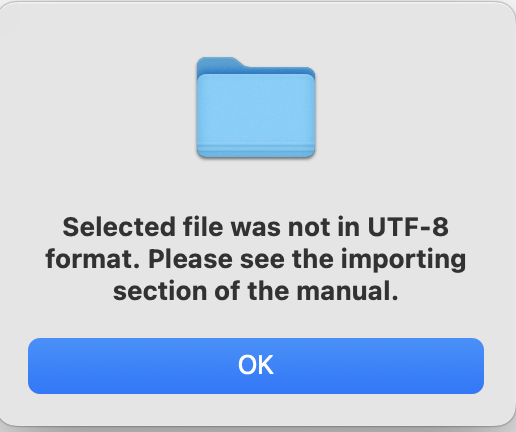
I’m having issues viewing the images. I downloaded the images but for some reason it’s not letting me import the file. I keep running into this error. I have all the recommended add-ons and restarted my Anki but for some reason I can’t figure it out.
Tags should be used as for the rest of Anki. Please search for AnKing tutorial videos on YouTube, here, or on reddit at r/medicalschoolanki about how to study using tags.
Once you learn how to use tags, you should focus your PANCE studies on your weak areas after reviewing your EORs, EOC, and PACKRATs. This should give you many areas to focus. The PANCE Blueprint can guide you in which areas are more/less high yield in terms of content. For more, look on reddit on r/PAschoolanki or r/PAschool.
I am not familiar with that error, but perhaps this workaround might help? Or see if you can right click on the media file and change the encoding to UTF-8. A search through Ankihub or reddit might also get you something if not.
I guess my question is after I download the media from google drive, am I supposed to import that file into Anki? cause I hit import file at the bottom and then I get this far and see that error I mentioned earlier. There are a lot of images so am I supposed to import each one ?

You do need to import media, yes, but it shouldn’t require file-by-file individual importing…
Can you try importing via google drive link instead? So, AnkiHub > Import Media > Google Drive and then use: https://drive.google.com/file/d/1bV1WY7h8ApOyTmUE6WJquM3zQwTd4wL_/view?usp=share_link
Alternatively, you could try to drag and drop all of the media from the #EndeavorOverhaul media folder you downloaded into the AnkiHub media folder. So, AnkiHub > Import Media > Open Media Folder and then drag everything in.
Sync Media after either attempt and see if one of those works for you.
okay got it thank you!
1 Like
I am not sure if I downloaded the deck correctly/missing cards. The deck shows that I have 6803 notes but I also have the Anking deck so I assumed that there were ~3k duplicates that didn’t download but I’m unsure if that’s correct. I tried using both the !EOR tag and the !PANCE tag to study for MSK and I feel like its missing a lot of information. For example, the IM-MSK- Rheumatoid arthritis tag has only 8 cards. The PANCE MSK Rheumatoid arthritis tag has 10 cards. Is this accurate or am I missing cards and how do I fix that?
1 Like
Some of your Endeavor cards were likely sorted into the AnKing deck. You can also use their #PANCE tags to study. I am showing 328 notes tagged under PANCE-MSK. When you were downloading the deck, did it say it skipped any cards?
You could try going into AnkiHub > Deck Management and seeing were the Destination for New Cards is set for your Endeavor deck. Perhaps trying to delete and re-sync your Endeavor deck once you have it’s New Card Destination set appropriately.
My current count for cards tagged for IM EOR (so tag is !EOR::IM ) is 2157 notes. Not sure where you’re getting the 1000 from. Tags are added frequently as we update cards.
Hi, Just wanted to confirm if anyone else Anki deck is showing 899 cards for the surgery EOR tag? Also is the surgery EOR tag, based off the new updated Surgery blueprint.
My deck currently shows 732 nots tagged !EOR::SURGERY. Counts are updated frequently as new tags are added, so the exact number is not all that useful unless you are missing lots of cards. Some of yours may be duplicates, perhaps from the old deck.
Regarding latest blueprint, not exactly. It appears that only a few topics were removed (heme, health maintenance) and a few additional topics were included such as breast/trauma and anesthesia. These were already included on my EOR a few years ago aside from the anesthesia part. Work in progress.
Hi all,
I’m not seeing a pediatrics deck – how do I pull that up? Studying for my PA Pediatrics EOR. Thanks!
Trina
There are no subdecks in this. Are you unsuspending cards tagged !EOR::PEDS ?
Ah, gotcha. Just fixed it by suspending the entire deck and then only unsuspending the EOR PEDS tagged cards. Thank you!
1 Like
Hi all, I’m very confused. I think I may be missing cards. I went to browse and selected the “tag:!EOR::IM” and it says there are 1743 cards. But @mmatheso says there should be 2157 notes (I’m assuming notes are cards?) So I’m very distraught as I already began studying and now it seems I am missing important cards? Here is a screenshot, you can see the amount of cards at the top.

1 Like
Look in the upper left where the Cards toggle is – see if switching that to Notes gives you the appropriate card count.
See AnKing videos on YouTube about Notes vs Cards (Notes can have multiple Cards) or this reddit explanation.
Edit: Your screenshot also shows your cards tagged !EOR::IM are sorted into at least two different decks: the normal EndeavorOverhaul deck, and some sort of subdeck called (?) EndeavorOverhaul::IM. Not sure if other card sorting is also throwing off your counts. The AnkiHub EndeavorOverhaul deck does not come with any subdecks.
Additionally, if you had the old Endeavor deck from Reddit or the AnKing deck already downloaded when you added the EndeavorOverhaul deck, some notes may be sorted into your existing decks.
Hi! I’m having trouble importing the media.
- The error message I get is: 500: specified file not found in archive.
- When I use the Check Media tool, I get this: Missing files: 5809 Unused files: 458
- It doesn’t let me import from a non-compressed file.
Nevermind, I got it! I had to manually import the media into the AnkiHub Import Media tab
1 Like
Hi, those were subdecks I made to better sort my decks out.
I am having some trouble importing the media to my deck. When I try to export the media separately using the Google Drive link above I get this error on both anki web and desktop “500: specified file not found in archive.” Some images are present but often cards say “an image is missing.” Thank you for your help!
Hello I’m having an issue where I download the deck and follow the steps but I only get 6802 cards instead of the 9k?