Hello,
I have noticed that the step1 v12 bnb psych tag has only one card in it and is missing everything else. I tried the reset all local changes technique and it didn’t fix it. Please advise
Hello,
I have noticed that the step1 v12 bnb psych tag has only one card in it and is missing everything else. I tried the reset all local changes technique and it didn’t fix it. Please advise
I’ll help you with this issue about missing tags in the BnB Anking Step1 deck. Let me search for relevant information about this problem.
Found 2 results for 'tags:official bnb tags missing reset local changes'
Hi Burakbuybay,
This sounds like you’re experiencing an issue with missing cards in the BnB Psych tag for Step 1 v12. Since resetting all local changes didn’t work, let me suggest a few troubleshooting steps:
First, check if you’re fully synced with AnkiHub
Try resetting just the specific tag group
Instead of resetting all local changes, you can reset just the specific tag group:
Verify tag hierarchy
Check if the tag is enabled
If these steps don’t resolve your issue, it could potentially be a problem with the deck itself. The AnkiHub team might need to look into this specifically.
Would you be able to check if other users are experiencing the same issue with that specific tag? This would help determine if it’s a local problem or a broader issue with the deck.
Hello,
Here are some steps you can follow to see if we can get this resolved:
Please ensure you are on the latest version of Anki. You can download it here: https://apps.ankiweb.net/. After downloading, simply run the downloaded file to update your application.
Next, update the AnkiHub add-on:
Tools > Add-ons > Check for Updates.Then, go to the deck page on the AnkiHub website (Sign In), click on the three dots, and send us a screenshot of your protected tags.
After that, please reset your local changes by following this tutorial: How to Reset Local Changes
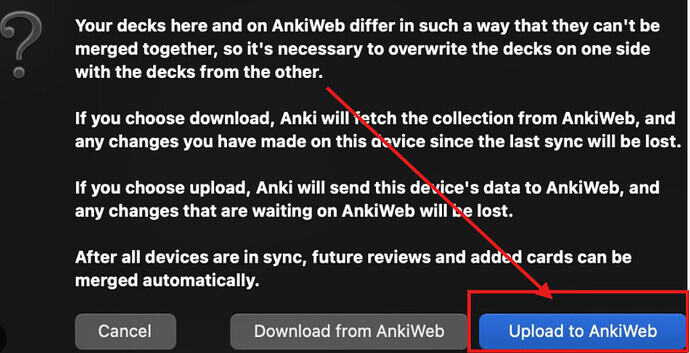
If you see the message below, click “Upload to AnkiWeb.”
After completing these steps, please click on the #AK_Step1_v12 tag and tell us the number that appears in the top-left corner of the screen.
If the issue persists, please send us a screenshot of the tag you mentioned so we can get a clearer picture of what is happening.
Let me know if you need help with anything else. 
I’ll help answer this question about missing tags in the BnB AnKing Step1 deck. Let me search for more specific information that might be relevant.
Found 0 results for 'tags:official bnb psych missing cards tags'
Found 3 results for 'tags:official bnb missing cards'
Reading: How to Reset Local Changes
Hi Burakbuybay,
I see that you’re having an issue with the BnB Psych tag in the Step 1 v12 deck showing only one card instead of the complete set. Marcos has already provided excellent instructions, but I’ll add a few specific tips focused on your BnB Psych tag issue:
Update everything first as Marcos suggested:
Reset the specific tag group:
Check your protected tags:
Reset all local changes as a final option:
After completing these steps, check the #AK_Step1_v12 tag as Marcos suggested and note the number of cards showing in the top-left corner.
If you’re still having issues with the BnB Psych tag specifically, please provide a screenshot of the tag hierarchy and the card browser when you search for BnB Psych tags, as this will help the team diagnose the exact problem.
Let us know if these steps help resolve your issue!
This topic was automatically closed 7 days after the last reply. New replies are no longer allowed.