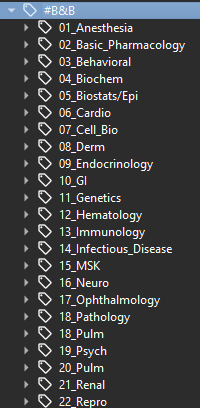
My BB tags are duplicate but even then, the subtags are not organized. I tried to reset local changes and sync with ankihub, but that didn’t do anything. How can I fix this?
I’ll help you with this issue regarding duplicate and disorganized BB tags in the AnKing Step 1 v12 deck. Let me first look at the thread you referenced to understand the context better.
Found 1 result for 'tags:official bb tags duplicate disorganized'
Search
Found 1 result for 'tags:official bb tags reset ankihub'
Hi Emzeng,
I understand your frustration with the duplicate and disorganized BB tags in the AnKing Step 1 v12 deck. This is a known issue that others have experienced as well.
Based on the thread you referenced and my research, here’s how you can fix this issue:
Solution:
Try a complete reset of local changes:
Open Anki and go to the Browse view
Click on the AnkiHub menu at the top
Select Reset all local changes
Make sure to select the AnKing Step 1 v12 deck specifically
Click OK and then sync with AnkiHub
If that doesn’t work, try this extended approach:
Close Anki completely
Restart Anki while holding down the Shift key (this disables add-ons temporarily)
Once Anki opens, go to Tools → Add-ons → AnkiHub → Config
Click “Reset to defaults” to ensure your AnkiHub settings are correct
Restart Anki normally
Try the reset local changes process again
If you’re still having issues:
Make sure your AnkiHub subscription is active (as noted in the other thread, an inactive subscription can cause tag issues)
Try using the “Check for updates” option in the AnkiHub menu to ensure you have the latest version
The duplicate BB tags often occur due to tag structure updates in the AnKing deck where both old and new tag structures are present. A proper reset of local changes should resolve this by applying the latest tag structure from the AnkiHub server.
If these steps don’t resolve your issue, please let me know and provide some additional details about your Anki version and AnkiHub add-on version so we can further troubleshoot.
I’ll help you troubleshoot this persistent issue with the duplicate and disorganized BB tags. Let me search for more specific information about this problem.
Search
Found 2 results for 'tags:official ankihub tag structure reset troubleshooting'
Search
Found 2 results for 'tags:official duplicate tags ankihub'
Found 0 results for 'tags:official tag conflicts ankihub sync'
Search
Found 2 results for 'tags:official fixing tag structure'
Search
Found 0 results for 'tags:official force tag update ankihub'
Search
Found 1 result for 'tags:official tag sync issues'
Hi Emzeng,
I understand you’re still having issues with duplicate and disorganized BB tags even after attempting the initial troubleshooting steps. Let’s try a more thorough approach since you’re using Anki 25.02.5 with the latest AnkiHub add-on.
Advanced Troubleshooting for BB Tag Issues:
1. Try a Complete Tag Reset Process:
In Anki, go to the Browse view
Select all the cards with BB tags (search for tag:BB or similar)
Right-click and select “Remove Tags” to remove the problematic tags
Go to the AnkiHub menu → “Check for updates” to pull fresh tag data
Then AnkiHub menu → “Reset all local changes” specifically for the AnKing deck
Sync with AnkiWeb and AnkiHub
2. Try Optional Tag Groups:
There’s a special process for resetting optional tag groups that may help with your situation:
Go to Browse → AnkiHub menu → Optional Tags
If you see the BB tags listed there, select them and click “Reset”
Follow the prompts to reset those specific tag groups without affecting your other customizations
3. Check for Sync Conflicts:
Make sure you’re not experiencing sync conflicts between AnkiWeb and AnkiHub
First sync with AnkiWeb (top-right sync button)
Then sync with AnkiHub (AnkiHub menu → Check for updates)
If prompted about conflicts, choose to download from AnkiHub
4. Database Check and Optimization:
Close Anki
Restart while holding Shift to disable add-ons
Go to Tools → Check Database
Close and restart Anki normally
Try the reset process again
5. Last Resort Options:
If nothing else works:
Export your personal cards/notes (not the AnKing content) as a separate .apkg file
Create a new Anki profile
Subscribe to AnKing deck in the new profile
Import your personal cards
This gives you a fresh start with the deck and proper tag structure
If these steps don’t resolve your issue, it would be helpful to see a screenshot of your AnkiHub menu showing your subscription status and perhaps a screenshot of your tag hierarchy expanded further to better understand the exact duplication pattern.
Would any of these more advanced solutions work for your situation?
You can check your AnkiHub_Deleted tag. It contains cards that were deleted by AnkiHub, but we still keep them in your Anki collection in case you didn’t want them deleted. You can delete all the cards with that tag and then use the “Clear Unused Tags” option.
If this issue doesn’t go away, please make sure you don’t have cards of your own in these tags. If you don’t, it’s because the retagging of B&B is still in progress, and you will likely be able to click “Clear Unused Tags” in the near future to delete these tags once they are empty.
In that case, you likely don’t have any of your own cards under that tag. Editing existing cards wouldn’t cause this particular issue.
The problem occurs when you intentionally add your own cards to an AnKing tag. Here’s a step-by-step explanation of what happens:
When AnkiHub retags cards, it creates new tags and moves the cards to this new tag.
The “Clear Unused Tags” tool is then used to mass delete these old tags. However, this tool can only delete tags that are completely empty.
Since AnkiHub doesn’t control your custom-made cards, they aren’t moved to the new tag during the update. They remain under the old tag.
Because your cards are still in the old tag, it isn’t empty, and the “Clear Unused Tags” tool fails to remove it. This leaves you with both the old and new versions of the tag.
Thank you for explaining! As for the current disorganized/incorrect BB tags, is there a reason why they are like that/how can I fix them? I have classmates who have the same version but their tags are not messed up. Mine are duplicate/unorganized vs theirs is like:
Unfortunately, we can’t use your friend’s tags as a reference because I don’t have enough context about their Anki collection. I don’t know if they have an active account or if their collection is up to date with AnkiHub. In fact, the tags in your screenshot don’t match mine, which are current. The screenshots of your tags seem to indicate they are only partially updated, which would explain why they look disorganized.
Please follow these steps carefully to resolve the issue. Even if you’ve done some of these before, please try them again to ensure we cover all bases:
Make sure you have an active AnkiHub account.
Please ensure you are on the latest version of Anki. You can download it here: https://apps.ankiweb.net/. After downloading, simply run the downloaded file to update your application.
On your Anki main screen, go to Tools > Add-ons > Check for Updates. After the update is complete, please restart Anki.
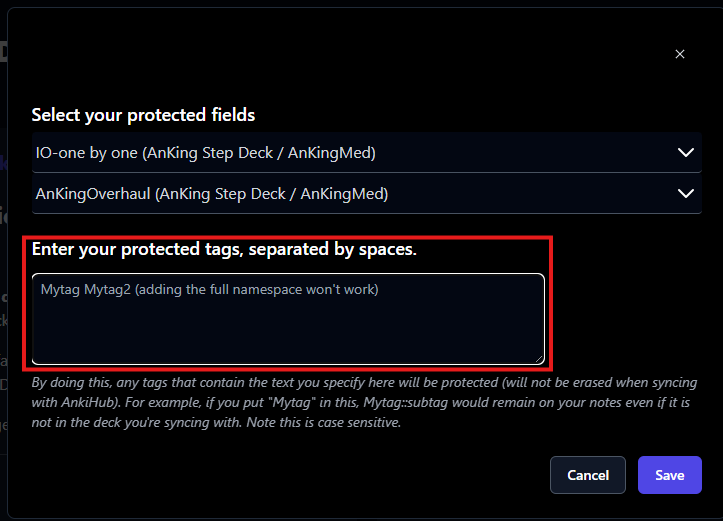
Make sure you don’t have any protected AnKing tags here: