Hi I would like to import Anking step deck as a completely blank slate (I previously did some review and all the FSRS parameters are out of whack - 3,6,9 days for “good” answer on new cards). I have tried the hard reset through the normal anki method, but this does not work with FSRS. Is there a way to completely remove the cards history. Normally, deleting a deck and reloading it would work, but Anking uses a syncing system that doesn’t seem to fit this.
I’ll help you find a solution for resetting your AnKing Step deck FSRS parameters. Let me search for some relevant information first.
Search
Found 4 results for 'tags:official FSRS reset review history AnkiHub'
Search
Found 2 results for 'tags:official FSRS reset'
Search
Found 2 results for 'tags:official reset AnkiHub deck FSRS parameters'
Read topic
Reading: I accidentally deleted tags/cards, how do I recover them?
Read topic
Search
Found 3 results for 'tags:official AnkiHub FSRS reset review history'
Hi Charlespace1,
To import the Anking Step Deck without the FSRS review history, you can use the “Reset Local Changes” feature in AnkiHub. This will give you a fresh start with the deck while maintaining the content.
Here’s how to do it:
- Open Anki and go to the Browse window
- Click on AnkiHub in the top menu bar
- Select Reset all local changes
- Choose the Anking Step Deck from the list
- Click OK
This will reset the deck to its original state from AnkiHub, removing your review history and any FSRS parameters that have been calculated based on your previous study sessions.
If you want to ensure your FSRS settings are completely reset, you can also:
- Go to the deck options for the Step Deck
- Navigate to the Advanced tab
- Under FSRS, you can either disable FSRS completely or reset the parameters to default values
Note that by default, AnkiHub protects your scheduling when you update decks, but the “Reset Local Changes” feature will override this protection and give you a completely fresh version of the deck.
Would you like any additional information about managing FSRS parameters or AnkiHub deck settings?
Hello,
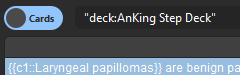
Go to Browse and select all the cards in the AnKing Step Deck to reset their status:
- Go to the Browse screen.
- Click on the AnKing Step Deck in the sidebar on the left.
- Click on one random card and then hit Ctrl+A (or Cmd+A).
- Right-click and select ‘Reset’.
Make sure to have the options “Cards” enabled so this option appears.
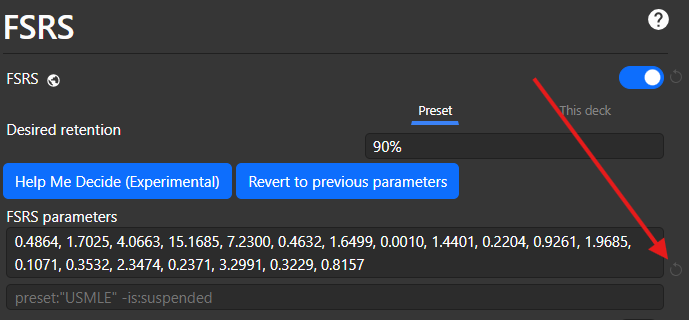
Then, go to the deck settings and click here to reset the FSRS parameters.
Just clarifying, AnkiHub just syncs your cards; it doesn’t interfere with your progress or card status. That’s an Anki thing.
Let me know if you need help with anything else. 