The category for general support questions related to using AnkiHub.
Things not to ask about here:
Please include supporting information and documents such as screenshots, recordings, etc.
I’ll help you with your AnkiHub support question. It seems like you’re having an issue with the AnKing deck not fully downloading all cards (19k out of 36k). Let me search for relevant information to help you.
Search
Found 2 results for 'tags:official AnKing partial download incomplete cards'
Search
Found 2 results for 'tags:official incomplete download cards missing'
Search
Found 1 result for 'tags:official partial download missing cards AnkiHub'
Search
Found 0 results for 'tags:official not downloading all cards partial'
Search
Found 4 results for 'tags:official not downloading all cards'
Search
Found 1 result for 'tags:official incomplete sync AnkiHub'
Search
Found 5 results for 'tags:official AnkiHub subscription issues'
Hi claregolden11, welcome to the AnkiHub community!
I see that you’re experiencing an issue with the AnKing deck not fully downloading - you mention having only 19,000 out of 36,000 expected cards. This is a frustrating situation, but I’d like to help troubleshoot.
Here are some possible reasons and solutions for incomplete deck downloads:
Possible Causes:
- Sync Issues: Sometimes AnkiHub syncing can be interrupted or incomplete.
- Subscription Status: Some content might be restricted based on subscription status.
- Deck Configuration: Your AnkiHub settings might be filtering certain cards.
- Network Problems: Intermittent connection issues during download.
Troubleshooting Steps:
-
Check Your AnkiHub Sync Status:
- Open AnkiHub add-on in Anki
- Try a full resync (you may need to use the “Force Full Sync” option)
-
Verify Deck Settings:
- Check if you have any filters applied in AnkiHub that might be excluding cards
- Ensure your “Home Deck” destination is properly configured
-
Check for Error Messages:
- Look for any error notifications during sync
- Check the sync logs for clues about missing cards
-
Update Add-ons:
- Make sure your AnkiHub add-on is the latest version
- Check if other add-ons might be interfering with the download
Additional Information Needed:
To better assist you, it would be helpful if you could provide:
- Screenshots of your AnkiHub dashboard
- Any error messages you’re receiving
- The exact name/version of the AnKing deck you’re trying to download
- Your Anki and AnkiHub add-on versions
If you’ve tried the above steps without success, please share more details about your specific situation, and we’ll be happy to provide further assistance!
Hello,
First, let’s try a quick fix. Please try resetting local changes. Here’s a tutorial: How to Reset Local Changes
If that doesn’t help, could you please provide more information?
- Which deck are you having this problem with?
- When did you download the deck?
- Do you have any other decks in Anki? Please send us a screenshot of your Anki main screen so we can better understand the situation.
- Where did you see the number 19k? The AnKing Step Deck has around 35k cards (or approximately 28k notes).
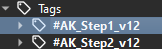
Please search for this tag in the Browser and tell me how many cards it says it has in the top-left corner.
 AnkiHub Decks)