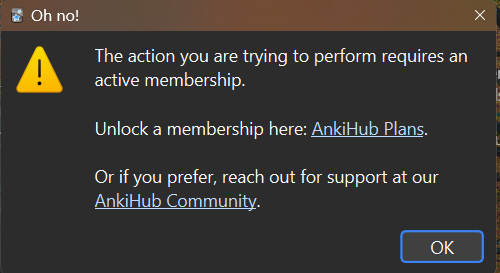
This massage appear when i try to sync with AnkiHub. I have a scholarship membership. is this mean my scholarship cancelled?
Thank you for reaching out! Our moderators have been notified and will assist you shortly. In the meantime, you can get an instant response from me simply by @ mentioning my username`. Alternatively, start a private conversation with me (see screenshot below). If you ask me a question, I will do my best to respond using only verified information found in the official AnkiHub docs and the Anki manual.
You can also find answers to common questions in our FAQ and Docs.

Thinking
Search
Found 0 results for ‘tags:official scholarship membership requires an active membership sync ankihub category: Support order:latest max_posts:10 status:open’
That message doesn’t automatically mean your scholarship was cancelled; it just means AnkiHub currently thinks your account does not have an active membership.
A few quick checks you can do:
-
Confirm you’re logged into the correct AnkiHub account
- In Anki Desktop, go to
Tools → Add-ons → AnkiHub → Config(or Account) and verify the email there. - Make sure it’s the same email that has the scholarship on the AnkiHub website.
- In Anki Desktop, go to
-
Check your membership status on the web
- Go to AnkiHub Plans and log in.
- Look at your subscription/membership section and see if:
- The scholarship is still listed as active, or
- It shows as expired/cancelled.
-
If the web says you do have an active scholarship
- In Anki Desktop:
- Log out of AnkiHub in the add‑on (if possible) and log back in.
- Then try syncing again.
- If it still fails, it’s likely an account‑side issue that only staff can fix.
- In Anki Desktop:
-
If the web shows no active membership or scholarship
- Your scholarship may have expired or not renewed correctly.
- In that case, you’ll need AnkiHub support to review your account/scholarship.
Since this is an account/billing issue, the best next step is:
- Open a ticket or send a message to AnkiHub support (link from the dialog or via the main site), and
- Include:
- The email of your AnkiHub account
- That you are/were on a scholarship membership
- A copy of the error screenshot
They can check whether your scholarship is still valid and re‑enable access if something went wrong.
Hello,
I would be happy to help. 
It looks like the bot captured the response pretty well:
In looking at your account, it appears that you were on a scholarship that started in July or so, yeah?
It looks to be that your current scholarship has run its course, in that scholarships typically run for 6-month periods after which the scholarship ends at the culmination of that span. That is likely to be the source behind the pop-up message that you are seeing there
Please let me know if that answers your question, and if there’s anything else we can help with.
1 Like
This topic was automatically closed 7 days after the last reply. New replies are no longer allowed.