Hello,
Please follow these steps so we can get you set up properly:
-
On your Anki main screen, go to
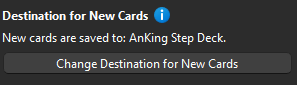
AnkiHub > Deck Management. Select the AnKing Step Deck and then check if the destination for new cards is set to the correct deck.
-
Reset local changes using this tutorial: How to Reset Local Changes
-
Go to the Browser on your Anki and, in the top left corner, go to
Notes > Clear Unused Tags. -
If at any time your Anki shows this prompt:
Click Upload to AnkiWeb. -
Click on the tag
#AK_Step1_v12and tell me how many cards it shows in the top-left corner.

Could you send a screenshot of this issue? In the screenshot you sent, you can click “Preview” on the edit card tab to see a preview.