I’m the owner of the Yanki deck on AnkiHub. My local deck Yanki is linked and uploads work (I saw a sync that updated 229 notes, and 3 test cards appeared on AnkiHub).
However, any cards placed in new subdecks under Yanki::MS1 SEM 2::Summer::Public Health Module X are ignored: AnkiHub says “No changes to upload”.
I confirmed the note types match, and that new cards in an older Yanki subdeck do upload. I also tried making a new Summer-style subdeck under Yanki and moving a few cards there—still “No changes to upload”.
It seems new subdecks I create under Yanki are not included in the AnkiHub deck definition. Could someone from AnkiHub support check my deck configuration and help ensure these Summer/Public Health subdecks are included in the sync?
Hello,
I would be happy to help. 
It may be worth noting that AnkiHub, generally, does not track subdeck location and so simply moving cards into a different deck or subdeck won’t be registered in any real way
In order to ‘tell’ AnkiHub that you would like to assign specific cards to a particular deck, or subdeck you’ll want to first make sure that you’ve enabled subdecks for your deck, which can be done from within Anki by going to your top menu bar: AnkiHub - Deck Management, and selecting the deck in question:

From here, subdeck location is assigned via the use of tags. An example here, as it just happens to be the first one I have handy, is the Behavioral subdeck for the AnKing MCAT deck, which would have a tag as so:
- AnkiHub_Subdeck::AnKing-MCAT::Behavioral
This tag then ensures that the card is ‘assigned’ to that particular subdeck
These settings will be controlled on the user side, and so the adjustments I walked through above would be the best way to go about setting your deck up in the way that I understand of your description. There isn’t a specific setting, really, that we can adjust on our end as all of the intrinsic functions are already present; it’s just a matter of coordinating your deck however serves you best.
Please let me know if that answers your question, and if there’s anything else I can help with.
Hello,
Thank you so much for your help. The main issue that i keep having is that when I go to sync the cards to ankihub, none of them go to the public deck that I have set on ankihub. I uploaded the deck when I first made it public but now when I make new cards they do not get added to the deck and when I try to sync with ankihub it keeps telling me that there are no new updates. I have made sure that the note types are all the same and are published note types on ankihub as well. I have also tried to bulk suggest the notes to ankihub but it keeps telling me to try to sync with ankihub first which does not work. The only way that I can get the new cards onto ankihub is by deleting my public deck and reuploading the whole deck again but everyone subscribed to my deck has to resubscribe and find my deck again and then redownload.
Can you show me what you’re seeing when you see this? I want to make sure I’m on the same page just so I can best be of help
The more context you can share the easier it may be to be of help. Screenshots are ideal, if you can, just so I can see what you’re seeing

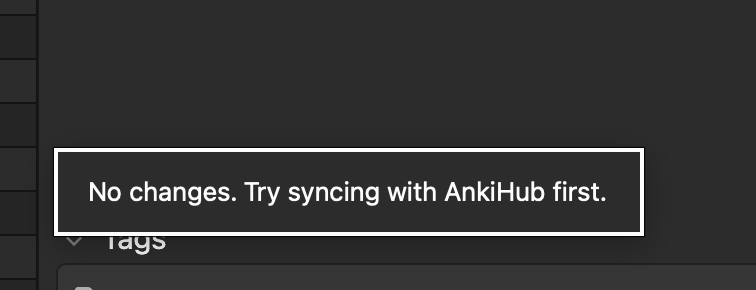


The first picture is me trying to bulk suggest notes to the ankihub and the second one is me suggesting an individual card to ankihub using the suggest button. I have tried syncing with AnkiHub first and it gives me “no note changes” . I am trying to get all the decks under “summer” which is the subdecks in the Yanki deck onto the ankihub. That would include everything under Medical Jurisprudence and Public Health. Thank you for all your time and help I really appreciate it.
I included other screenshots that I thought might possibly be helpful as well.
Just so I’m on the same page: what changes did you make to those cards before suggesting them?
At the risk of the obvious, but just so we don’t overlook anything, if AnkiHub doesn’t detect a change then there won’t have been any changes to submit, so to speak.
As an example: if you moved the cards locally to a different deck or subdeck, AnkiHub won’t immediately ‘see’ that as it doesn’t inherently track card location (aside from knowing that the card is present, obviously).
If you’re wanting to assign cards to a specific subdeck location, it would be done as we touched on previously:
I have not made any changes to the cards. What I normally do is create cards and then email them to some friends in my class. When I figured out that I could potentially upload all my cards to ankihub and just have them subscribe and download the updates from there I thought it would be easier than emailing them out every single day. What I did was upload what I already had done from this past semester to the ankihub. Those have all been uploaded and there is no problem with those. The problem is with the cards that I have made since the initial upload to the ankihub. Every card that I have made since the initial upload to ankihub has not and will not upload to the subscribable deck. The only thing that has worked in the past was to delete the entire deck off ankihub and reupload every card. The problem with doing that is that when I delete the deck then everyone who subscribed to it is now gone and they would have to resubscribe and download every single day.
If I am not communicating clearly I apologize. If you think this would be easier to handle over the phone or something like that I am fair game in order to get this to work. Thank you for all your help I really appreciate your quick responses.
It may be worth noting that the image you shared of a ‘bulk suggestion’ which involves suggesting a change to a card. From the sound of it, you may have instead wanted to suggest a new note

In either case, the image you shared appears to show that 0 notes were suggested for change, and 0 notes were suggested for submission. That would be what I would double-check first, at least
Of the 22 notes that you selected, the message states “no changes were detected.”
It’s hard to offer much more insight without knowing which cards, and which deck, it is though from what you’ve shared it looks to my eyes like you may have been suggesting changes to cards that did not have changes, rather than suggesting new notes. That would be my guess, at any rate
I would see if you can’t double-check your workflow there, and see if that doesn’t do the trick. If it doesn’t work, or if you have any other questions, please follow up and we’ll do our best to get you squared away. 