How to remove this white bar at the bottom of Anki card? Appears on every Anki card and is very distracting. Started showing up today. Thank you.

Thank you for reaching out! Our moderators have been notified and will assist you shortly. In the meantime, you can get an instant response from me simply by @ mentioning my username`. Alternatively, start a private conversation with me (see screenshot below). If you ask me a question, I will do my best to respond using only verified information found in the official AnkiHub docs and the Anki manual.
You can also find answers to common questions in our FAQ and Docs.

Hello,
There are a few things it could be, but let’s try the likeliest solution first.
First, I would make sure that you have enough storage on your mobile device.
Then, from your desktop device head to Preferences:
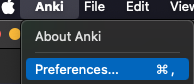
From there, under ‘Syncing’ you’ll want to toggle on ‘on next sync, force changes in one direction’:
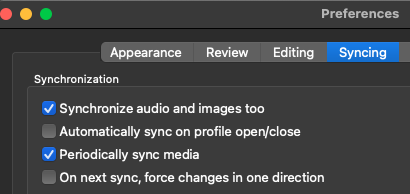
Then, go back to your main Anki screen, hit sync, and select ‘upload.’
Give it a few seconds, hit sync on your mobile device, and select ‘download.’
If that does the trick, great. If not, we’ll keep going. 
Hi, I tried this solution on my Mac. Mac version of Anki looks normal/same as before, but the phone version still has the white tab at the bottom of the Anki card.
Kk. On your desktop do you happen to have the Anking Note Types add-on installed?
Nope
Kk, I’m fairly certain that what happened is that the Anking note type was updated yesterday and, without that add-on, your current note type is now falling out of date a bit. I had the same issue yesterday and was able to update in a few minutes and the issue resolved itself.
First, you’ll want to install the Anking Note Types add-on (https://ankiweb.net/shared/info/952691989). If it’s easier, the code is: 952691989
Once you have it installed, it may prompt you to update automatically but if it doesn’t you can click here:
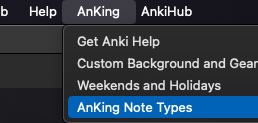
And then you should have a button that says ‘update notetypes’ that looks like this:
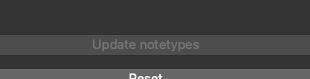
In this case, mine is greyed out because I’ve already updated. If you can, click that and then restart Anki. It’s possible you may have to do this twice.
Once you’ve got that all done, and your note types are fully updated, I would do another one-way sync and, at least for me, this seemed to resolve the issue yesterday.
Let me know how/if that works for you and we’ll go from there.
There is a new release of the AnkiHub add-on which fixes the issue. You don’t need to install the Anking Note Types add-on for it to work.
This topic was automatically closed 7 days after the last reply. New replies are no longer allowed.