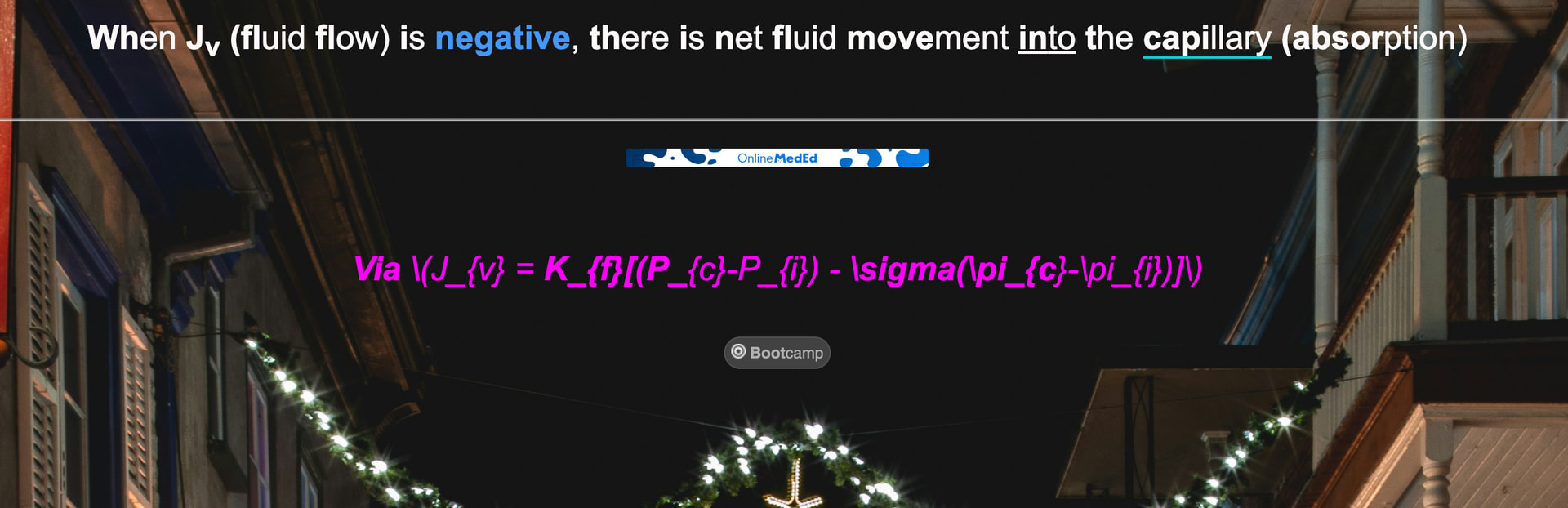
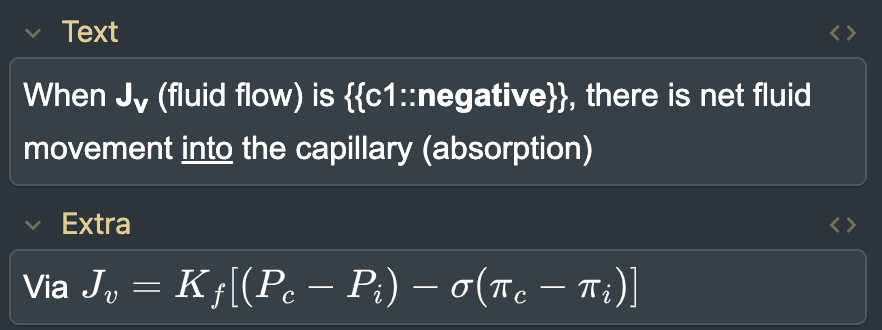
I am using the AnKing Step deck, and the equations are not displaying whenever I am studying the cards. I have pasted screenshots below.
I checked the same card on my friend’s computer, and it displayed normally, so this is an issue only on my computer. I went through the troubleshooting steps, and it is not any of my add-ons, and my Anki is up to date. How can I fix this? I do not want to go through and update all of the equations out of MathJax.
I’ll help you troubleshoot the issue with equations not displaying when studying cards in the AnKing Step deck. Let me search for any relevant information on this topic.
Thinking...
Search
Found 0 results for ‘tags:official mathjax equations not displaying’
Search
Found 0 results for ‘tags:official mathjax equations’
Search
Found 0 results for ‘tags:official equations not displaying’
Search
Found 0 results for ‘tags:official mathjax’
Search
Found 0 results for ‘tags:official mathjax’
Search
Found 1 result for ‘tags:official math equations’
It seems I’m having trouble finding specific information about MathJax equation display issues in the AnkiHub community. Let me try a more general search:
Thinking...
Search
Found 1 result for ‘tags:official troubleshooting display issues’
This issue with MathJax equations not displaying during review (but showing correctly in the editor) is typically related to one of a few common causes. Since you’ve already ruled out add-ons and confirmed your Anki is up to date, let’s try these solutions:
Possible fixes:
Restart Anki completely - Sometimes the MathJax renderer needs a fresh start.
Check Database - Go to Tools > Check Database to ensure your collection is in good shape.
Change Video Driver - This is often the culprit! Display issues like this can be related to your video driver:
Go to Tools > Preferences > Basic
Try changing the video driver (Software, OpenGL, or Auto)
Restart Anki after each change to see if it resolves the issue
Clear Browser Cache (if viewing through AnkiWeb)
Reset window sizes - In the preferences screen, try clicking “Reset window sizes” and restart Anki
Check your template - Sometimes template code conflicts can cause MathJax not to render. If you’re comfortable checking the card template, make sure there are no syntax conflicts.
Since the same card displays correctly on your friend’s computer, it’s very likely to be a local configuration issue rather than a problem with the AnKiHub content itself. The video driver setting is the most common fix for this type of rendering problem.
Let me know if any of these solutions work for you!
You’ve found an interesting clue about the potential cause - formatting conflicts with MathJax can indeed cause rendering issues. Here’s what you can try:
Troubleshooting MathJax with Formatting Conflicts
Check for HTML conflicts: MathJax can sometimes have issues when it’s surrounded by HTML formatting like bold or colored text. If your equations are inside or adjacent to <b>, <span style="color...">, or similar HTML tags, this might be causing the problem.
Try editing the card template:
In the Browse window, select one of the problematic cards
Click “Cards…” button to view the template
Look for any formatting in the template that might be wrapping around where the equations appear
Try temporarily simplifying the template to see if the equations render
Debug Console approach:
Press Ctrl+Shift+; (or Cmd+Shift+; on Mac) to open the debug console
Enter: mw.requirejs("mathjax").config.tex.extensions to check your MathJax configuration
Try a local fix for specific cards: If you can’t modify the deck template (since it’s an AnKiHub shared deck), you might be able to add this to your card template to help with MathJax conflicts:
<script>
// Force MathJax to reprocess when card is shown
window.addEventListener('load', function() {
  if(typeof MathJax !== 'undefined') {
    MathJax.Hub.Queue(["Typeset", MathJax.Hub]);
  }
});
</script>
Temporary fix: If needed for studying urgently, you could try taking screenshots of the equations from the editor and pasting them into your cards until a better solution is found.
Since this seems to be a specific issue with your system (as it works on your friend’s computer), it might also be worth trying a clean install of Anki while backing up your collection.
Let me know if any of these solutions work for you!
On Windows: Press Ctrl+Shift+; (the control key, shift key, and semi-colon key at the same time)
On Mac: Press Command+Shift+; (the command key, shift key, and semi-colon key at the same time)
On some non-English keyboards, you might need to press : or + instead of ;.
This will open a small window where you can enter commands to check or modify Anki settings. The debug console is useful for advanced troubleshooting like checking your MathJax configuration.
As Ahmed7 suggested, this issue might be related to formatting conflicts. Even though you don’t have the bionic reading add-on, there could be formatting in the cards causing MathJax to not render properly.
Try using the debug console to check your MathJax configuration by entering:
mw.requirejs("mathjax").config.tex.extensions
Another thing to try is to check if the card has special formatting in its template that might be interfering with MathJax rendering.
Let me know if you need help with any other steps!
The error message you’re seeing in the debug console indicates there’s an issue with the command syntax. This is likely because the command format has changed in newer versions of Anki. Let’s try a different approach to troubleshooting your MathJax issue.
Regarding your debug console error:
The requirejs command format is outdated for your version of Anki. For newer versions, you might try:
from anki.utils import point_version
print(f"Anki version: {point_version()}")
This will at least confirm your Anki version, which might help us troubleshoot further.
For your MathJax display issue:
Based on the screenshots you’ve shared and Ahmed7’s observation, I think we can now see the likely cause - there appears to be some formatting (bold/colored text) that might be interfering with MathJax rendering.
Try these specific solutions:
Reset your note type:
In the Browse window, select one of the problematic cards
Right-click on it and choose “Notes” > “Change Note Type”
Select the same note type (this effectively resets it without changing the type)
Click OK to apply
Check for hidden/subtle add-ons:
Sometimes add-ons don’t appear in the list but still affect card display
Try restarting Anki while holding down the Shift key (this disables all add-ons)
See if your equations display correctly in this mode
Try a different computer temporarily:
Since it works on your friend’s computer, this confirms it’s a local issue
If possible, export a small portion of your collection and try it on another computer
Check for CSS conflicts:
Look for any custom styling in your card templates that might be interfering with MathJax
The fact that Ahmed7 spotted the bold formatting in your card is a very strong clue. This type of formatting is often the culprit with MathJax display issues!
The Bionic Reading add-on adds a script to your template, and it can still take effect even after uninstalling it. To remove the script manually without the add-on:
Open the edit screen for any AnKing note.
Click the Cards button to open the templates screen.
Search for _bionic-reading.js in the front/back templates. You should find a line containing something like <script src="_bionic-reading.js"></script>. Delete it and save changes.