I’m trying to access some optional tags. I subscribed to the optional tag on AnkiHub (I have an active membership btw) and synced my Anki with AnkiHub. I even got a brief popup saying the deck was syncing with the new optional tag I subscribed to. However, I don’t have an ankihub optional tab on the right of my anki search menu. I can’t seem to locate or search for any of these tags. How can I see which cards have this tag?
Thank you for reaching out! Our moderators have been notified and will assist you shortly. In the meantime, you can get an instant response from me simply by @ mentioning my username`. Alternatively, start a private conversation with me (see screenshot below). If you ask me a question, I will do my best to respond using only verified information found in the official AnkiHub docs and the Anki manual.
You can also find answers to common questions in our FAQ and Docs.

Thinking
Search
Found 0 results for ‘tags:official AnkiHub optional tags sidebar tab missing category: Support order:latest max_posts:20 tags:ankihub-add-on+optional-tags status:open’
Search
Found 0 results for ‘tags:official optional tags sidebar missing category: Support order:latest max_posts:20 tags:ankihub-add-on status:open’
The “AnkiHub Optional” section in the browser sidebar only shows up if all of these are true:
-
AnkiHub add-on is installed and up to date
- In Anki, go to
Tools → Add-onsand confirm:- “AnkiHub” is listed and enabled.
- Click View files → config.json (or Config) and make sure there are no obvious errors.
- Click Check for Updates and restart Anki after updating.
- In Anki, go to
-
You’re on a deck that actually has optional tags
- In the Browser, click into the specific AnkiHub deck (e.g. your AnKing deck).
- Some older/converted decks or non-official decks may not expose optional tags, so the sidebar section won’t appear.
-
Sidebar is in “Full” mode
- In the Browser, right‑click in the left sidebar and make sure it’s not in a minimized/filtered view (if you see “Collapse All”, the sidebar is already expanded).
- Use the Sidebar filter box at the top and type “optional” to check if maybe it’s just collapsed.
-
AnkiHub login + sync completed without errors
- Go to
AnkiHub → Log out, then log in again. AnkiHub → Sync with AnkiHuband wait until it fully finishes (no red error bar).- After syncing, close and reopen the Browser (or restart Anki).
- Go to
-
Check if the tags exist via search
- In the Browser search bar, manually search for one of the optional tags you subscribed to, e.g.:
tag:"your_optional_tag_here" - If you get hits, the tags are present; the problem is just the sidebar display.
- If you get no results, the optional tags likely didn’t download properly.
- In the Browser search bar, manually search for one of the optional tags you subscribed to, e.g.:
If, after confirming the above, you still don’t see an “AnkiHub Optional” section in the sidebar:
- Go to
AnkiHub → Open Logs Folder. - After trying a sync again, grab the most recent log file.
- Upload that log in a reply here, and also share:
- Your Anki version
- Your AnkiHub add-on version
- The exact deck and optional tag you subscribed to
With that information, the team can check whether this is a bug with the optional-tag sidebar for your setup.
Hello,
I would be happy to help. 
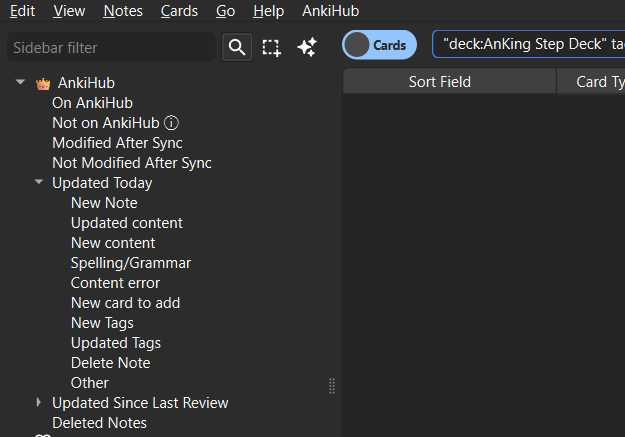
The optional tag to which you are subscribing does not appear to have any tags, which is why the optional pane is not displaying:

Please let me know if that answers your question, and if there’s anything else I can help with.
1 Like
I notified the tag-maker and they found an issue on their end. Thank you for your quick response and help.
1 Like
This topic was automatically closed 7 days after the last reply. New replies are no longer allowed.