When I dowloaded the lightyear deck, already having the Colorful Tags Hierarchical Tags add-on, all the tags for that deck was still messed up and didn’t show up properly. Does anyone know why this is happening?



Thinking
Search
Found 0 results for ‘tags:official Colorful Tags Hierarchical Tags lightyear deck tags not working category: Support order:latest_topic max_posts:20 status:open’
This usually isn’t a problem with the Lightyear deck itself, but with how the Colorful Tags / Hierarchical Tags add‑ons read your tag names and config.
A few things to check:
1. Make sure the tags are actually hierarchical
Open the Browser → left sidebar → Tags.
The hierarchical add‑on only treats tags as “nested” if they use the right separators, e.g.:
LY::Cardio::ArrhythmiasLightyear::Neuro::Seizures
If your Lightyear tags look more like this:
LY_Cardio_ArrhythmiasLightyear-Neuro-Seizures
then they won’t show up as a hierarchy. That’s just how the note tags are named, and the add‑on can’t change that automatically.
If that’s the case, the behavior you see is expected; you’d need to rename tags (or use a tag‑renaming tool) to convert _ / - into :: if you really want a hierarchical tree. That’s independent of AnkiHub.
2. Check the Hierarchical Tags add‑on settings
From your screenshot of the config window:
- Tools → Add‑ons → select Hierarchical Tags 2 (or similar) → Config.
- Confirm you have something like:
or, if you changed it, that it matches what your tags actually use.{ "separator": "::" }
If your tags use :: but the config separator is "." or "/", they will look “messed up” and flat.
3. Interaction with AnkiHub
AnkiHub itself doesn’t modify tag formatting; it just syncs whatever tags the shared deck uses. So:
- If the tags look flat / inconsistent on a fresh profile without any add‑ons, that’s how the Lightyear deck was tagged.
- If they look normal on a fresh profile but broken in your main profile, it’s almost certainly an add‑on or config conflict.
To test:
- File → Switch Profile → Create a new empty profile.
- Install only:
- AnkiHub
- Colorful Tags
- Hierarchical Tags
- Import the Lightyear deck and check the Tags list.
Tell us:
- Do the tags look hierarchical there?
- What Anki version and OS you’re on?
If you can share a close‑up screenshot of 4–5 Lightyear tags in the Browser’s sidebar, I can tell you quickly whether this is a naming (deck) issue vs a configuration/add‑on issue and suggest the exact fix.
Hello!
Nowadays, Anki already has a hierarchical tag system built-in. The tags not being organized is a problem with the deck itself, not the lack of an add-on. You can see in your screenshot that the tags for the AnKing Step Deck are perfectly organized in a hierarchical way.
Unfortunately, since the Lightyear deck is not an official deck maintained by the AnkiHub team, I can’t really offer much help with that issue. You might want to try contacting the deck author to see if they can help.
You can also refer to the add-on page to see that in newer Anki versions, the add-on doesn’t actually organize tag hierarchies because that feature is now built into Anki:

Let me know if you need help with anything else! 
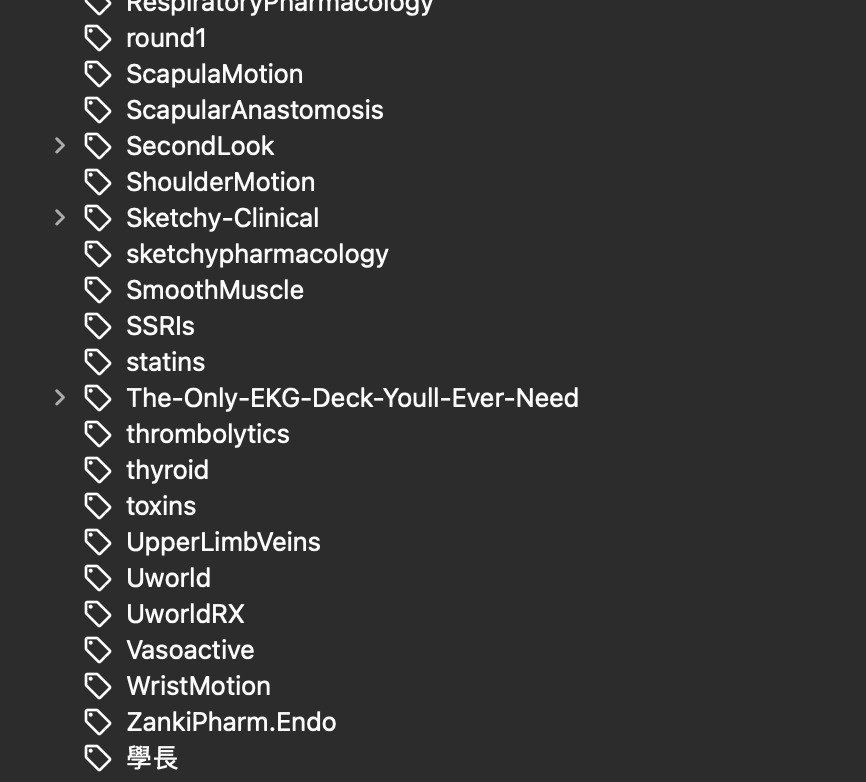
Oh I just realized the tags for lightyear deck is normal! I just couldn’t find it because I had so many tags XD. Do you know if it is normal to have these amount of tags? because a lot of the specific tags are for cards in the Anking deck, but i don’t think they fall in the Anking step 1 or 2 tag. Does that mean I can delete those cards that are not in the Anking step 1 or step 2 tag(that weren’t created by me)? Or is there something wrong with my tagging system? Or is there a way I can clean up my tags?
Thank you!
The number of tags you have depends on how many and which decks you have installed. Sometimes, tags remain even after you delete a deck unless you specifically remove them. It is likely you installed a deck previously that did not have a very good tag hierarchy.
You can start by clearing unused tags. This will remove any tag that is not attached to a card. In the Browser, go to Notes > Clear Unused Tags.

From there, the only way to clear more tags is to delete the cards or decks that you do not use, and then perform the “Clear Unused Tags” process again. Or to just right-click a tag and delete it (note that cards are not deleted when you delete a tag directly)
Below is a list of all the AnKing tags for the AnKing Step Deck (I recommend you do not delete them):
- #AK_Step1_v12
- #AK_Step2_v12
- #AK_Step3_v12
- #AK_Other
- #PANCE
- AnkiHub_Subdeck
Thanks for the reply! Yes I think it was mostly likely because I dowloaded a deck with bad tag organization :((
I tried to clean all unused tags, but it ends out I have 0. Also, as you can see a lot of the cards here are in the anking deck, they just aren’t tagged under anking. Should I still go ahead and delete the cards and the tags in this case?

Now I have a better understanding of what is happening! It looks like you have an older version of the AnKing deck installed.
All the cards from the v12 version (the up to date one) downloaded via AnkiHub are located under the tags I mentioned. Therefore, any cards not found under those tags, such as the majority of tags below the AnkiHub_Subdeck tag, can be safely deleted.
I recommend creating a new deck specifically for the v12 cards. After moving them, you can safely delete the remaining old decks. Please follow this tutorial to learn how: How to move cards from your old V11 deck to a new deck
The AnKing Step Deck v12 on AnkiHub does not use subdecks by default; it relies entirely on the tag system. Once you follow the tutorial, move the v12 cards to a new deck, and delete the others, you will only see the tag system. There will be no subdecks on your main Anki screen.
If you are new to Anki, I recommend following this tutorial to configure your deck settings correctly and learn how to use the tag system to find and unsuspend the specific cards you want to study: How to Get Started Studying
Oh yeah, I used to have the v11 version!
So just to double check with you, I follow the tutorial to move my v12 cards(based on the tutorial the v12 cards are the ones that have the AnKingOverhaul (AnKing Step Deck / AnKingMed) note type) into a new deck. Then the rest of the cards in the original deck(the one where v11 and v12 where combined in) can be deleted by me?
Thank you so much for the help 
Yes, if you moved all the cards that have this note type to a new deck, you can delete the other decks (if you don’t want to keep them). The V12 deck is the updated version and receives daily updates, so unless you have a specific use for the older cards, they are not very useful anymore.
Also, if at any time you think you deleted something unintentionally, you can always reset local changes: How to Reset Local Changes. This will restore anything missing from the AnKing Step Deck.
This topic was automatically closed 7 days after the last reply. New replies are no longer allowed.