Yes i did have that about when the problem started, and I have seen it a few times since
Hi,
Thank you for that information. It helps us a lot in understanding the issue you’re facing!
Please follow these steps carefully, and we should be on our way to fixing the issue:
- Reset local changes: Don’t worry, you won’t lose any cards or progress. This will just ensure your deck matches the official version. Here’s a tutorial: How to Reset Local Changes
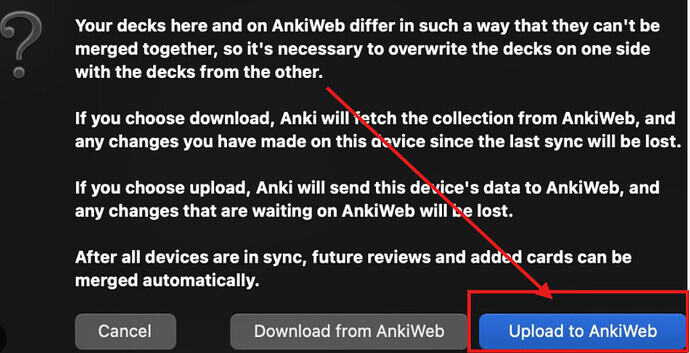
- Click Sync and when the message below appears, please click Upload to AnkiWeb. This will back up the corrected version of your deck to the cloud. If you click “Download,” the original issue will return.
- After that, please click on “Browse” and send us a screenshot of the tags. Also, click on the
#AK_Step1_v12tag and tell us which number appears in the top-left corner of the screen.


Please don’t hesitate to ask for help with any of these steps! 
Thank you! I did the above but did not get the message to download or upload to ankiweb again. My Current card count is 33031

The issue is still persisting everytime I open a new tag
It looks like you may have some old cards in your collection.
For instance, I see that you have BnB - 19 - Renal, as well as BnB - 21 - Renal. I would check the 21 - Renal and see if there are cards there.
Likely you are not missing any cards, but simply have some older ones present from a previous tagging hierarchy.
Give that a glance and please let us know what you find. 
Unfortunately the tags I have generated are missing cards under the tag. It’s hard for me to know if tags are missing under the anking cards ask I simply have not accessed all of them. but for example this tag had 136 cards under it yesterday. I’m not generating new cards, but pulling the relevant Anking cards.

Hello,
Just to clarify your previous issue, did you find the cards under the “21_Renal” tag instead of the “19_Renal” tag?
Regarding the current issue, the card shown in the preview (and likely most of the cards in your screenshot) is not from the AnKing Step Deck. Additionally, most of the tags shown, including the one you selected, are not part of the AnKing Step Deck.
Unfortunately, we can’t help much with that, as we don’t have control over your local Anki collection and don’t know where these cards are from.
However, if you have any more questions regarding the AnKing Step Deck itself and its tags, feel free to reach out!
Here is the AnKing Step Deck wiki so you can better understand the deck and its contents: AnKing Step Deck Wiki
Let me know if you need help with anything else.
Hi Marcos,
For a while I got my deck back to normal by resetting local changes and syncing with the anking deck, however that no longer appears to be working

Hello,
Could you tell me exactly what doesn’t seem to be working?
In the screenshot, I see that this tag has fewer cards than it should.
Since it has been a while since our last contact, could you tell me when things started going wrong again and if you changed anything after you got everything working last time? The more information you can give us about the problem, the better.
Also, after you noticed something was wrong, did you try any of the previous solutions again? I would really appreciate it if you could answer these questions.
In the meantime, here are some steps you can follow to see if we can get this solved right away:
-
Please ensure you are on the latest version of Anki. You can download it here: https://apps.ankiweb.net/. After downloading, simply run the downloaded file to update your application.
-
Next, update the AnkiHub add-on:
- On your Anki main screen, go to
Tools > Add-ons > Check for Updates. - After the update is complete, please restart Anki.
-
Then, go to the AnkiHub website deck page (Sign In), click on the three dots, and send us a screenshot of your protected tags. Have you protected any?
-
After that, please reset your local changes: How to Reset Local Changes

If this message appears, click “Upload to AnkiWeb.”
After completing these steps, please send us a screenshot of this same tag. Also, click on the #AK_Step1_v12 tag and tell us which number appears in the top-left corner of the screen. Last time, you had no missing cards in this tag.
Hi Marcos,
the issue is I’m missing cards under all of my tags. I tried all of the above before sending the screen shot above. I’ve been having this issue since last month and previously the above steps worked. I have to essentially do those steps everyday but it had been working, it is no longer working
@kgranitt This occurs even after clicking upload to ankiweb, correct?
Yes but I don’t always get that prompt after resetting local changes then syncing